VWProjectsを始める方法
by Walt Packer | 更新日: 03/03/2026 | コメント: 0
ブログトピック
Area / Application


Product Category


Corporate / News
ブログを検索する
ブログを購読する
興味のある分野に一致する新しいブログ記事が投稿されたときに電子メール通知を受信するように設定してください。
記事を提案する
もっと詳しく知りたいトピックはありますか? お知らせください。できるだけ具体的にご記入ください。
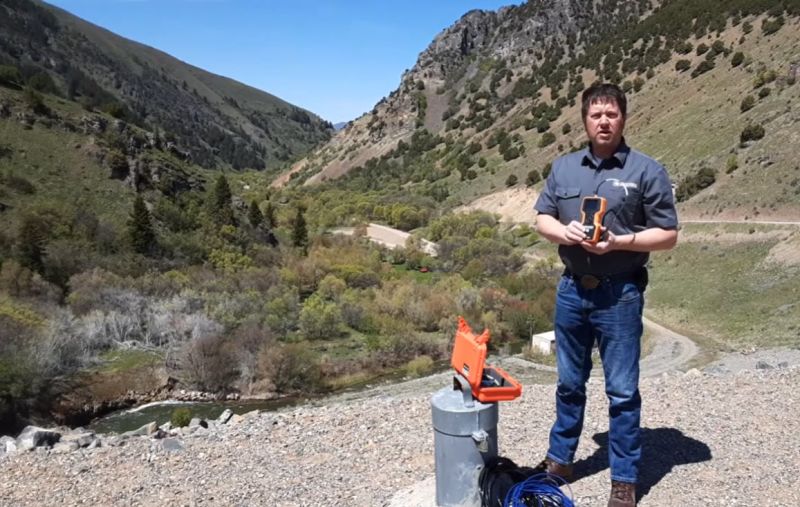
バイブレーティングワイヤセンサーの管理は、スプレッドシートの操作、係数の再入力、現場での設定エラーのトラブルシューティングといった煩わしい作業ではありません。VWProjectsは、セットアップの簡素化、エラーの削減、そして小規模な設置から大規模なインフラプロジェクトまで、あらゆる規模のシステムに対応できるよう設計されています。
この記事では、インストールについて説明し、プロジェクト ファイルを構成するための実用的なヒントを紹介し、Wolf Creek Dam での実際の展開で VWProjects を大規模に活用する方法を紹介します。
VWProjectsとは何ですか?
VWProjectsは、手持ち式 VWAnalyzer バイブレーティングワイヤーアナライザー用のプロジェクト管理ソフトウェアです。このソフトウェアを使用すると、センサーパラメータの定義、サイトの整理、ベースラインの管理、そして現場に赴く前にフィールド展開の準備を行うことができます。
VWProjects のセットアップは簡単ですか?
たった 2 つのステップで準備完了です。
ステップ 1: VWProjects をインストールします。
VWProjects をお使いのマシンにインストールするのは簡単です。2つの方法があります。
- ネットワーク インストール - ワークステーションに接続している場合は、VWAnalyzer ストレージ スペースで VWProjects 実行可能ファイルを直接見つけます。
- 直接ダウンロード – VWProjects ページからソフトウェアをダウンロードします。
インストールが完了したら、VWProjects を開いてプロジェクト ファイルの作成を開始します。
プロのヒント:アプリケーション ウィンドウが切れていたり、位置がずれているように見える場合は、Windows キー + 左矢印キーを押してスナップし、画面に合わせてサイズを変更します。
ステップ 2: プロジェクト ファイルを構成します。
VWProjectsを開いたら、次のステップはプロジェクトファイルの設定です。ここでセンサー、サイト、測定パラメータを定義します。
ベースライン読み取り値、ゲージ係数、センサーの標高を入力する
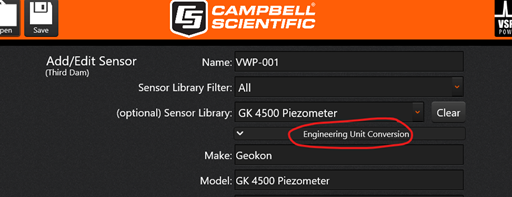
プロジェクトファイルインターフェースには、必要に応じてベースライン値、ゲージ係数、センサー標高を入力するための専用エリアがあります。これらの情報を最初から正しく設定しておくことで、モニタリングプロジェクトのライフサイクル全体を通してデータの正確性と一貫性を確保できます。以下のスクリーンショットでは、これらの情報を追加する場所を示しています。
センサーライブラリを使用して時間を節約する
VWProjectsの最も便利な機能の一つは、内蔵のセンサーライブラリです。ライブラリからセンサーを選択すると、以下のようになります。
- サーミスタまたは RTD 係数は自動的に入力されます。
- 周波数スイープはセンサーの種類に合わせて自動的に調整されます。
これにより、手動によるデータ入力エラーがなくなり、初期セットアップの速度が大幅に向上します。
シリアル番号でセンサーを追跡する
各センサーのシリアル番号をプロジェクトファイルに直接入力することで、資産の追跡と現場検証が容易になります。これは、大規模なセンサーネットワークの管理や現場でのトラブルシューティングにおいて大きな効果を発揮するシンプルなステップです。
容量の限界を知る
VWProjectsとVWAnalyzerは、プロジェクトファイルごとに最大880個の固有センサーをサポートします。マルチユーザーチームの場合、プラットフォームは20ユーザーまで最大40サイトへのアクセスをサポートし、サイトごとに22個のセンサーをサポートします。これらの制限を考慮してプロジェクト構造を最初から計画しておくことで、後々のフラストレーションを軽減できます。
実例:ウルフクリークダム
理論は役に立ちますが、実際のプロジェクトで VWProjects が実際に動作しているのを見ると、その全容がわかります。
米国陸軍工兵隊はウルフクリークダムでVWAnalyzerを使用し、合計193個のバイブレーティングワイヤーセンサーを監視しています。ダムはダム断面に基づいて複数のサイトに分割され、各ステーションには個別のセンサー名が割り当てられていました。VWProjectsでステーションを管理できるため、現場での測定時間が短縮され、すべての測定値はVWAnalyzerからサイトごとに1つのCSVファイルとしてダウンロードされました。
このような大規模な土木インフラのモニタリングでは、整理され、事前に構成されたプロジェクト ファイルがあると便利ですが、さらに重要なのは、時間を節約し、エラーを削減できることです。
VWProjects と VWAnalyzer を使用する理由は何ですか?
- コンピュータを使用してサイト全体またはプロジェクトベースのプロジェクト ファイルを作成することで時間を節約します。
- センサーを追加、交換、または削除するときにプロジェクト ファイルを修正します。
- 手動入力でフィールドにセンサーを追加します。
- ワンタイムセンサーを読み取ります。
VWAnalyzer と VWProjects を組み合わせることで、現場チームは各サイトが正確なデータを報告していることを認識しながら、より効率的に作業できます。
始める準備はできていますか?
VWProjectsは、バイブレーティングワイヤーセンサーのモニタリングをより正確かつ体系的に、そしてより迅速に現場で実行できるように設計されています。単一のセンサー設置から193個のセンサーを備えたダムモニタリングプロジェクトまで、ワークフローはお客様のニーズに合わせて拡張可能です。
すぐにプロジェクト ファイルの作成を開始するには、当社のサイトからVWProjectsをダウンロードしてください。
ご利用開始にあたって、さらに詳しい情報が必要ですか?ご質問やご意見がございましたら、弊社の営業チームまでお問い合わせいただくか、下記にコメントをお寄せください。
注: メイン画像には、Campbell Scientific, Inc. の Brent Randall 氏が写っています。


著者について
 Walt Packer is a Sales Specialist in the Infrastructure Group at Campbell Scientific, Inc., covering the Western US. He has a degree in geology and worked for the USGS, as well as multiple mining companies. When Walt isn’t helping customers, he enjoys spending time outdoors with his family.
コメント
Please log in or register to comment.